
Introduction
The aim of this audit it to disclose the compliance of the Healthcare Scotland website against the Web Content Accessibility Guidelines (WCAG) 2.2 AA standards.
WordPress & NHS Nightingale
We use Wordpress as our content management system and along with this the NHS Nightingale theme which is generally WCAG 2.2 complaint. This audit assumes compliance is met however any theme issues found will be raised with the theme owner as this is not something we can change without impacting the core theme.
This audit will focus on the bespoke elements of the system such as the homepage & Scottish Approach to Change. This will complement and follow on the independent accessibility report undertaken by Government Digital Services in October 2024
Tools and tests used
- Axe cli
- Stark chrome extension
- Claude Sonnet
- Voiceover for safari
- NVDA for Firefox
- JAWS for Chrome
- Testing the website at 400% zoom
- Access the website on a mobile device
- Navigate the site purely with a keyboard and speech recognition
- Changes colours, contrast and fonts
Previous audit
URL: https://reports.accessibility-monitoring.service.gov.uk/reports/9e624f11-adad-49c5-9883-517d40e57036
Pages audited
Hospital at Home Programme – March 2025 update – Healthcare Improvement Scotland
Improving care – Healthcare Improvement Scotland
Accessibility statement and what isn’t accessible?
The Health Improvement Scotland website strives to be accessible to the WCAG 2.2 AA standard as expected by public sector bodies. The compliance of the HTML aspects of the website is good with only one issue disclosed which is inherited from the Nightingale theme.
The issue has been disclosed in the accessibility statement and highlighted to the theme owner for consideration and resolution.
See the following URL
Accessibility statement – Healthcare Improvement Scotland
WCAG 2.4.3 Focus Order
- Keyboard-only users cannot efficiently navigate the menu structure
- Mega menu items may not be fully accessible via keyboard if focus moves away before users can reach all options
During audit issues found and resolved
Header
Issues
- Duplicate Skip Links (WCAG 2.4.1 – Bypass Blocks)
- Two identical “Skip to content” links in original file
- One was inside phase banner wrapper (removed in current version)
- Skip link must be first focusable element after body open
- Cookie Banner Role (WCAG 4.1.2 – Name, Role, Value)
- Originally used role=”region” which is too generic for interactive dialogs
- Now correctly uses role=”dialog”
- Properly associated with aria-labelledby and aria-describedby
- Button Type Attributes (WCAG 4.1.2 – Name, Role, Value)
- Cookie banner buttons originally lacked explicit type=”button”
- Could be misinterpreted as submit buttons in form contexts
- Now properly specified
- Search Region Semantics (WCAG 4.1.2 – Name, Role, Value)
- Search container originally had no semantic role
- Missing accessible label for search functionality
- Now includes role=”search” and aria-label
- Phase Banner Landmark (WCAG 1.3.1 – Info and Relationships)
- Originally had role=”complementary” on wrapper div instead of banner itself
- Skip link was incorrectly nested inside banner
- Now properly structured with role on banner and descriptive label
- Main Content Landmark (WCAG 1.3.1, 4.1.2 – Info and Relationships)
- Main element includes explicit role=”main” for older assistive technologies
- Consistent ID matching skip link target (#maincontent)
- Document Structure (Best Practice)
- wp_body_open() now called immediately after <body> tag
- Proper hook placement for WordPress plugins and themes
Actions
1.3.1 Info and Relationships
- Proper landmark structure with role=”complementary” on phase banner
- role=”main” on main content area
- role=”banner” already present on header element
- role=”search” added to search region
2.4.1 Bypass Blocks
- Single skip link as first focusable element
- Skip link target #maincontent matches main element ID
- Skip link properly positioned
4.1.2 Name, Role, Value
- Cookie banner uses role=”dialog” with proper ARIA associations
- All buttons have explicit type=”button”
- Search region has role=”search” and aria-label=”Search this website”
- Main element has explicit role=”main”
- Phase banner has descriptive aria-label=”Service phase information”
Footer
Issues
1. Missing Skip Links (WCAG 2.4.1 – Bypass Blocks)
- No “skip to main content” or “back to top” links
- Users can’t easily bypass the footer content
2. Social Link Context (WCAG 2.4.4 – Link Purpose)
- Generic social media descriptions
- Could be more specific about the organization’s social presence
3. Footer Sections (WCAG 1.3.1 – Info and Relationships)
- Could benefit from better semantic sectioning
4. Logo Accessibility (WCAG 2.4.4 – Link Purpose)
- Footer logo isn’t linked to homepage (common expectation)
- Missing navigation context
5. Copyright Semantics (WCAG 1.3.1 – Info and Relationships)
- Could use better semantic markup for copyright information
Actions
1.1.1 Non-text Content
- Better alt text and hidden decorative elements
1.3.1 Info and Relationships
- Proper semantic structure with sections and landmarks
2.4.4 Link Purpose
- Descriptive link labels and context
2.4.6 Headings and Labels
- Better heading hierarchy and descriptive labels
4.1.2 Name, Role, Value
- Enhanced ARIA attributes and explicit roles
Homepage
URL https://www.healthcareimprovementscotland.scot/
Hero Banner

Issues
Current WCAG 2.2 Issues Identified:
1. Missing Banner Landmark (WCAG 1.3.1 – Info and Relationships)
- Should use <header> or banner role for homepage hero sections
- Screen readers can’t identify this as a primary page introduction
2. Background Image Accessibility (WCAG 1.1.1 – Non-text Content)
- Decorative background image has no context for screen readers
- No fallback if image fails to load
3. Button Purpose Clarity (WCAG 2.4.4 – Link Purpose)
- Generic “Learn More” text lacks context
- No indication of destination or purpose
4. Missing Section Context (WCAG 2.4.6 – Headings and Labels)
- No clear identification that this is a hero/banner section
- H1 lacks context about the section purpose
5. Icon Accessibility (WCAG 1.1.1 – Non-text Content)
- Missing focusable=”false” on decorative SVG
Actions
1.1.1 Non-text Content
- Background image context and decorative icon handling
1.3.1 Info and Relationships
- Proper landmark structure with header/banner
2.4.4 Link Purpose
- Descriptive button labels with context
2.4.6 Headings and Labels
- Proper heading relationships with ARIA
2.4.7 Focus Visible
- Enhanced keyboard focus indicators
4.1.2 Name, Role, Value
- ARIA relationships and landmark roles
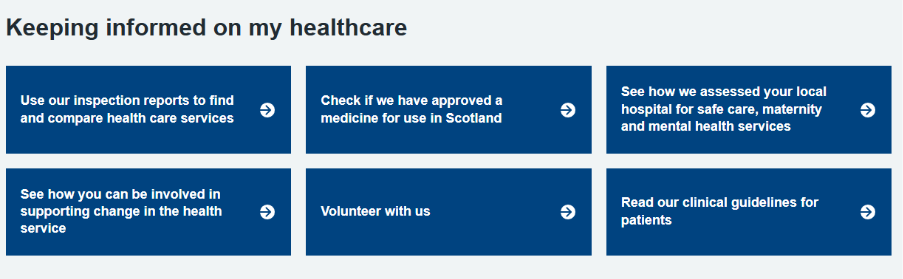
Keeping informed on my healthcare
Issues
1. Missing Section Context (WCAG 2.4.6 – Headings and Labels)
- No heading or landmark to identify the section purpose
- Screen readers can’t understand this is a “keeping informed” navigation area
2. Semantic Structure Issues (WCAG 1.3.1 – Info and Relationships)
- Missing proper landmark roles (<section> or <nav>)
- Grid of links should use list semantics for better navigation
- No proper heading hierarchy
3. Link Purpose Issues (WCAG 2.4.4 – Link Purpose)
- Links may lack context about their purpose
- No indication these are navigation/information links
4. Missing ARIA Context (WCAG 4.1.2 – Name, Role, Value)
- Limited ARIA labelling for the overall component
- No clear navigation landmark identification
Actions
1.1.1 Non-text Content
- Proper SVG icon handling
1.3.1 Info and Relationships
- Semantic landmarks and list structures
2.4.4 Link Purpose
- Clear, descriptive link labels
2.4.6 Headings and Labels
- Proper heading hierarchy for navigation
4.1.2 Name, Role, Value
- Enhanced ARIA attributes and roles
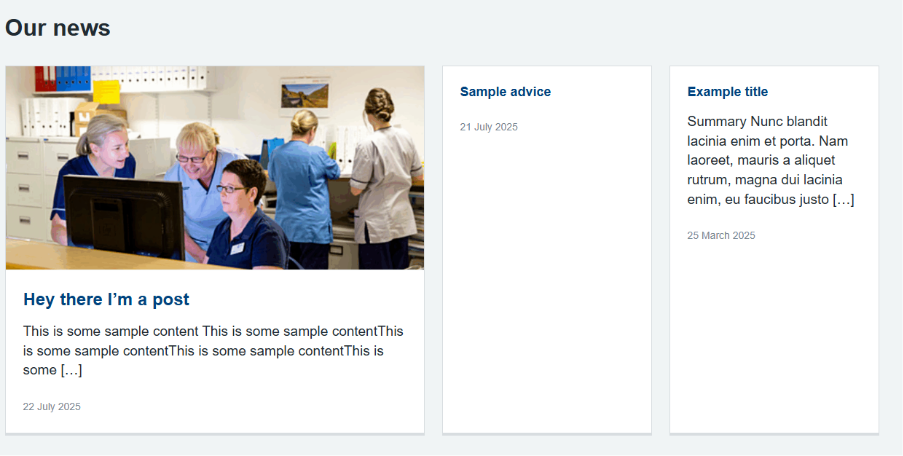
Latest News
Issues
1. Missing Featured Article Context (WCAG 1.3.1 – Info and Relationships)
- First article is visually “featured” but not announced to screen readers
- No indication of hierarchy or importance difference
2. Redundant ARIA Labels (WCAG 4.1.2 – Name, Role, Value)
- Time element has both visible text and aria-label saying similar things
- Could simplify for better screen reader experience
3. List Context Could Be Enhanced (WCAG 2.4.6 – Headings and Labels)
- Grid could benefit from more specific labelling about article types
4. Image Alt Text Handling (WCAG 1.1.1 – Non-text Content)
- Images are hidden but might benefit from better contextual handling
Actions
1.1.1 Non-text Content
- Proper image handling with aria-hidden
1.3.1 Info and Relationships
- Clear semantic structure and hierarchy
2.4.4 Link Purpose
- Descriptive link context with article type and position
2.4.6 Headings and Labels
- Enhanced labelling for featured vs standard articles
4.1.2 Name, Role, Value
- Proper ARIA roles and streamlined announcements
4.1.3 Status Messages
- Improved empty state communication
Documents
URL: Hospital at Home Programme – March 2025 update – Healthcare Improvement Scotland
Issues
Missing Screen Reader Announcements (WCAG 4.1.2 – Name, Role, Value)
- Content is inserted but not announced to screen readers
- The aria-live region we added isn’t being utilized
2. Focus Management (WCAG 2.4.3 – Focus Order)
- When users click anchor links, focus should move to target headings
- No focus management when navigation is ready
3. Redundant Hidden Heading (WCAG 2.4.6 – Headings and Labels)
- Creates unnecessary hidden h2 “Sections”
- We already have proper heading structure
4. List Semantics (WCAG 1.3.1 – Info and Relationships)
- Nested lists need proper ARIA roles
- List items need explicit roles for dynamically created content
5. Link Context (WCAG 2.4.4 – Link Purpose)
- Links lack sufficient context about heading level
- No indication of hierarchical structure
Actions
1.3.1 Info and Relationships
- Proper semantic navigation structure
2.4.6 Headings and Labels
- Descriptive heading and labels
4.1.2 Name, Role, Value
- ARIA attributes for dynamic content and clear roles
Improving Care
URL: Improving care – Healthcare Improvement Scotland
Issues
Nothing of note these come directly from the WordPress parent Nightengale theme and will have WCAG 2.2 compliance
Actions
No actions needed at this time
Publications
URL: https://www.healthcareimprovementscotland.scot/publications/
Issues
1. Missing form structure grouping – Related controls need fieldset/legend
- 1.3.1 Info and Relationships
- 4.1.2 Name, Role, Value
2. Incomplete error handling – Only one error message, missing ARIA associations
- 3.3.1 Error Identification
- 3.3.2 Labels or Instructions
- 4.1.3 Status Messages
3. Missing ARIA attributes – No aria-invalid, incomplete aria-describedby
- 4.1.2 Name, Role, Value
- 1.3.1 Info and Relationships
4. No focus management – Errors don’t receive focus
- 2.4.3 Focus Order
- 3.2.1 On Focus
5. Incomplete validation logic – Missing “before date” validation and date range checks
- 3.3.1 Error Identification
- 3.3.4 Error Prevention
Actions
- 1.3.1 Info and Relationships (semantic structure)
- 2.4.6 Headings and Labels (clear, descriptive labels)
- 3.2.2 On Input (predictable functionality)
- 3.3.1 Error Identification (clear error messages)
- 3.3.2 Labels or Instructions (proper labelling)
- 3.3.3 Error Suggestion (helpful error guidance)
- 4.1.2 Name, Role, Value (proper ARIA implementation)
- 4.1.3 Status Messages (live region announcements)
URL: Public Board meeting papers: 30 June 2025 – Healthcare Improvement Scotland
Issues
Nothing of note these come directly from the WordPress parent Nightengale theme and will have WCAG 2.2 compliance
Actions
No actions needed at this time
Improving Care
URL: Improving care – Healthcare Improvement Scotland
Issues
Nothing of note these come directly from the WordPress parent Nightengale theme and will have WCAG 2.2 compliance
Actions
No actions needed at this time
Scottish Approach to Change
URL: https://www.healthcareimprovementscotland.scot/improving-care/scottish-approach-to-change/

Issues
1. No visible focus state (WCAG 2.4.7 – Focus Visible / 2.4.11 – Focus Appearance)
- Links have no visual focus indicator when navigating by keyboard
- Both the title link and “Read more” link appear identical whether focused or not
2. Vague link text (WCAG 2.4.4 – Link Purpose)
- Every card has an identical “Read more” link with no context
- A screen reader reading all links on a page would hear repeated “Read more” entries with no way to distinguish between them
3. Image link has no label (WCAG 2.4.4 – Link Purpose / 4.1.2 – Name, Role, Value)
- The clickable image wrapper is an empty link with no accessible text
- Screen readers would announce “link” with no description of where it goes
4. Image alt text may be inappropriate (WCAG 1.1.1 – Non-text Content)
- Featured images use the page title as alt text regardless of image content
- This could be misleading if the image is decorative or doesn’t directly illustrate the title
5. SVG icon not fully hidden (WCAG 1.1.1 – Non-text Content)
- The arrow icon has aria-hidden=”true” but is missing focusable=”false”
- Older browsers may allow the SVG to receive focus even though it’s decorative
6. Styles duplicated on every card (WCAG 4.1.1 – Parsing)
- The entire <style> block is written into the page once per block instance
- On pages with multiple selected-pages-grid blocks this creates repetition
7. “Read more” link not associated with heading (WCAG 1.3.1 – Info and Relationships)
- Screen reader users navigating by links won’t hear which card the “Read more” refers to
- No programmatic relationship between the heading and the action link
Actions
1.1.1 Non-text Content
- Add focusable=”false” to the decorative arrow SVG
- Consider making featured images decorative (empty alt) since the title already provides context, or add a mechanism for custom alt text
1.3.1 Info and Relationships
- Use aria-labelledby to associate the “Read more” link with the card heading
2.4.4 Link Purpose / 4.1.2 Name, Role, Value
- Add aria-label to the image link identifying it as a link to the page title
- Append the page title to “Read more” links via aria-label (e.g., “Read more about [page title]”)
2.4.7 Focus Visible / 2.4.11 Focus Appearance
- Add :focus-visible styles to all links with a clear outline and high contrast
2.5.3 Label in Name
- Consider removing either the clickable heading link or the “Read more” link to reduce redundancy
- OR: Keep the heading as plain text and make only the “Read more” link clickable
4.1.1 Parsing
- Move inline styles to a registered stylesheet loaded once per page
Issues
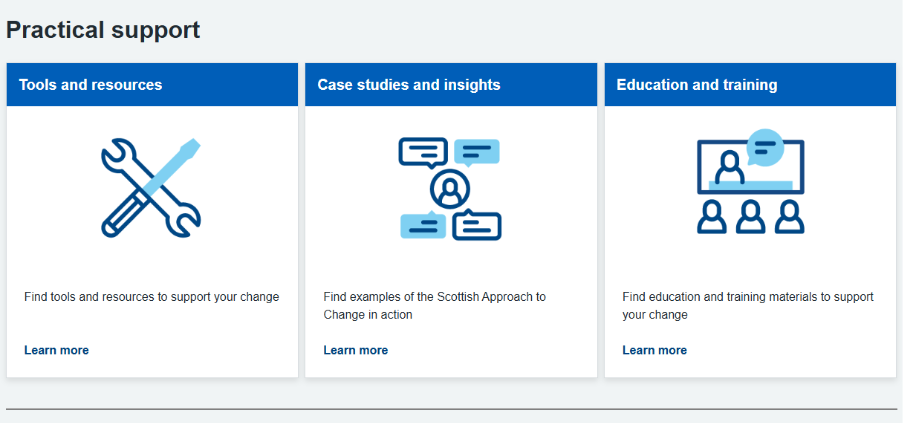
1. No visible focus state (WCAG 2.4.7 – Focus Visible / 2.4.11 – Focus Appearance)
- The link has no visual indicator when keyboard users tab to it
- Appears identical whether focused or not
2. Vague link text (WCAG 2.4.4 – Link Purpose)
- Default “Learn More” gives no context about the destination
- Multiple cards on one page would all say “Learn More” with no way to distinguish them
3. No new tab warning (WCAG 3.2.2 – On Input)
- When set to open in a new tab, users get no advance notice
- Disorienting for screen reader users and those with cognitive disabilities
4. Colour combination not validated (WCAG 1.4.3 – Contrast Minimum)
- Editors can choose any background/text colour pair
- Nothing prevents unreadable low-contrast combinations
5. Card title is not a heading (WCAG 1.3.1 – Info and Relationships)
- Uses a <div> instead of semantic heading markup
- Screen reader users navigating by headings won’t find card titles
6. SVG arrow not hidden from screen readers (WCAG 1.1.1 – Non-text Content)
- Decorative arrow icon lacks aria-hidden=”true” and focusable=”false”
- May be announced as unnamed content by assistive technology
7. Styles duplicated per card (WCAG 4.1.1 – Parsing)
- Full CSS block injected once for every card on the page
- Creates unnecessary repetition that can confuse assistive technology
8. Image alt text not prompted (WCAG 1.1.1 – Non-text Content)
- Alt text field defaults to empty with no editorial guidance
- Meaningful images may be left without descriptions
Actions
1.1.1 Non-text Content
- Add aria-hidden=”true” and focusable=”false” to decorative SVG arrow
- Add editor guidance for alt text when images are uploaded
1.3.1 Info and Relationships
- Change card title from <div> to semantic heading element (e.g., <h3>)
1.4.3 Contrast Minimum
- Validate colour combinations against WCAG contrast ratios
- Fall back to safe NHS Blue/white if validation fails
2.4.4 Link Purpose
- Add aria-label combining link text with card title for unique identification
2.4.7 Focus Visible / 2.4.11 Focus Appearance
- Add clear visible outline on link focus with high contrast
3.2.2 On Input
- Add visually hidden “opens in a new tab” text when that option is enabled
4.1.1 Parsing
- Move CSS to a registered stylesheet loaded once per page
Independent Healthcare provider search
Issues
1. No visible focus state (WCAG 2.4.7 – Focus Visible / 2.4.11 – Focus Appearance)
- Form inputs, selects, and buttons have no custom focus styling defined
- Users navigating by keyboard get only default browser focus which may be insufficient
2. Related fields not grouped (WCAG 1.3.1 – Info and Relationships)
- Postcode and distance fields are related but not wrapped in a <fieldset> with <legend>
- Screen reader users may not understand these fields work together
3. Error messages not associated on load (WCAG 3.3.1 – Error Identification / 4.1.2 – Name, Role, Value)
- Error spans exist but inputs don’t reference them via aria-describedby until errors occur
- No aria-invalid attribute toggled when validation fails
4. Vague select option text (WCAG 2.4.6 – Headings and Labels)
- Distance select has “select distance” in lowercase with no indication it’s a placeholder
- Could be confused as a valid option
5. No client-side validation feedback (WCAG 3.3.3 – Error Suggestion)
- Form submits via JavaScript but no visible inline error handling in the PHP
- Users may not know why their search failed
6. SVG in results not fully hidden (WCAG 1.1.1 – Non-text Content)
- Arrow SVG has aria-hidden=”true” but missing focusable=”false” in the format_service_html function
- Older browsers may allow focus on decorative SVG
7. Button contrast and focus (WCAG 1.4.11 – Non-text Contrast)
- Secondary reset button has no guaranteed contrast verification
- NHS button styles may handle this but no explicit check
Actions
1.1.1 Non-text Content
- Add focusable=”false” to decorative SVG arrow in format_service_html function
1.3.1 Info and Relationships
- Wrap postcode and distance fields in a <fieldset> with descriptive <legend>
2.4.6 Headings and Labels / 3.3.2 Labels or Instructions
- Change “select distance” to “Select distance” for consistency
- Add hint text explaining postcode and distance work together
3.3.1 Error Identification / 4.1.2 Name, Role, Value
- Add aria-describedby linking inputs to their error messages on page load
- Ensure aria-invalid=”true” is toggled when errors appear
3.3.3 Error Suggestion
- Enhance error messages with specific guidance (e.g., “Please enter a valid UK postcode”)
2.4.7 Focus Visible / 2.4.11 Focus Appearance
- Add clear focus styles for all form controls with high-contrast outlines